
Vintage Photo Effect Online Free
Add a vintage retro effect to any photo online free. Apply warm tones, faded colors, and film grain to create a classic vintage look instantly. No upload to servers, no signup, 100% free.
No image selected
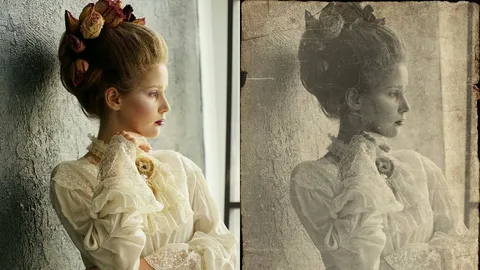
Why add a vintage photo effect online
Vintage and retro photo effects have been among the most popular photo filters since the rise of Instagram, and they remain consistently popular because they add warmth, nostalgia, and character to ordinary photos. A vintage effect transforms a clean digital photo into something that looks like it was taken on film decades ago — with warm color tones, slightly faded colors, and the subtle grain texture that characterizes film photography.
This style works especially well for portrait photos, travel photography, food photography, and lifestyle content. Many photographers and content creators across the UK and Europe use vintage effects as a consistent visual style for their social media profiles, giving their content a distinctive, cohesive look.
Vintage styles available
Classic Vintage — Warm amber and orange tones with increased contrast and subtle grain, mimicking the look of old 35mm film photography from the 1970s and 1980s. Works well with portraits, landscapes, and lifestyle photos.
Faded Film — Reduced contrast with lifted shadows and muted colors, replicating the look of old photographs that have faded over time. Creates a soft, dreamy aesthetic popular in lifestyle and travel photography.
Sepia Tone — The classic warm brown monochrome effect associated with early photography, giving any photo an antique appearance. Works especially well with portraits and architectural photos.
Cold Retro — A cooler vintage look with blue-green tones and faded highlights, mimicking the color cast of certain vintage film stocks. Creates a moodier, more cinematic vintage aesthetic.
What happens when you apply the effect here
Unlike apps and tools that upload your photo to a server for processing, Firaa applies the vintage effect entirely inside your browser. Your photo never leaves your device — no upload, no server, complete privacy. The effect is applied instantly using your browser’s canvas engine, with no wait time for uploads or downloads.
When you need a vintage photo effect
Instagram and social media content — A consistent vintage filter applied to your photos creates a cohesive, recognisable aesthetic for your Instagram profile or other social media presence. Many successful lifestyle, travel, and food accounts use a consistent vintage or retro style as their visual signature.
Photography projects — Photographers experimenting with different styles often use vintage effects to explore a different aesthetic without needing a film camera. The effect can be applied to any digital photo to simulate the warmth and character of film photography.
Personal photos and memories — Applying a vintage effect to recent photos of family, friends, or travel makes them feel more timeless and nostalgic, which is particularly appealing for photos you want to print and display.
Blog and website imagery — Bloggers and website owners in lifestyle, travel, food, and fashion niches often use consistent vintage-toned imagery throughout their content to create a strong visual identity that differentiates them from competitors using standard photography.
How to add vintage effect to photo — step by step
Upload your photo by clicking the upload button above. The vintage photo effect tool accepts JPG, JPEG, PNG, and WebP formats. Photos with clear subjects and good original lighting tend to produce the most striking vintage results.
Select your preferred vintage style — Classic Vintage, Faded Film, Sepia Tone, or Cold Retro. Each style applies a different combination of color adjustments, contrast changes, and grain to create a distinct vintage look.
Click Apply Vintage Effect. Your browser processes the image instantly and displays a download button for the finished vintage photo.
Frequently asked questions about vintage photo effects
Can I apply the vintage effect to a PNG image?
Yes. Upload any JPG, PNG, or WebP image and the vintage effect will be applied. The output will be a JPG file.
Will the vintage effect reduce my image quality?
The vintage effect changes the colors and adds grain to your photo as part of the artistic effect. The resolution and sharpness of your original photo are preserved — only the color and tone are adjusted.
Is my photo safe — does Firaa upload it to servers?
No. Your photo is processed entirely inside your browser. Nothing is uploaded to any server at any point.
Can I try different vintage styles on the same photo?
Yes. Select a different style and click Apply Vintage Effect again to try a different look on the same uploaded photo.
How is Firaa different from Instagram filters?
Instagram filters can only be applied within the Instagram app and the result can only be posted to Instagram. Firaa lets you download the vintage-effect photo as a file you can use anywhere — on any platform, in print, or in design projects.