
Convert Photo to Sketch Online Free
Turn any photo into a pencil sketch drawing online free. Upload your photo and download an artistic sketch version instantly. No upload to servers, no signup, 100% free.
No image selected
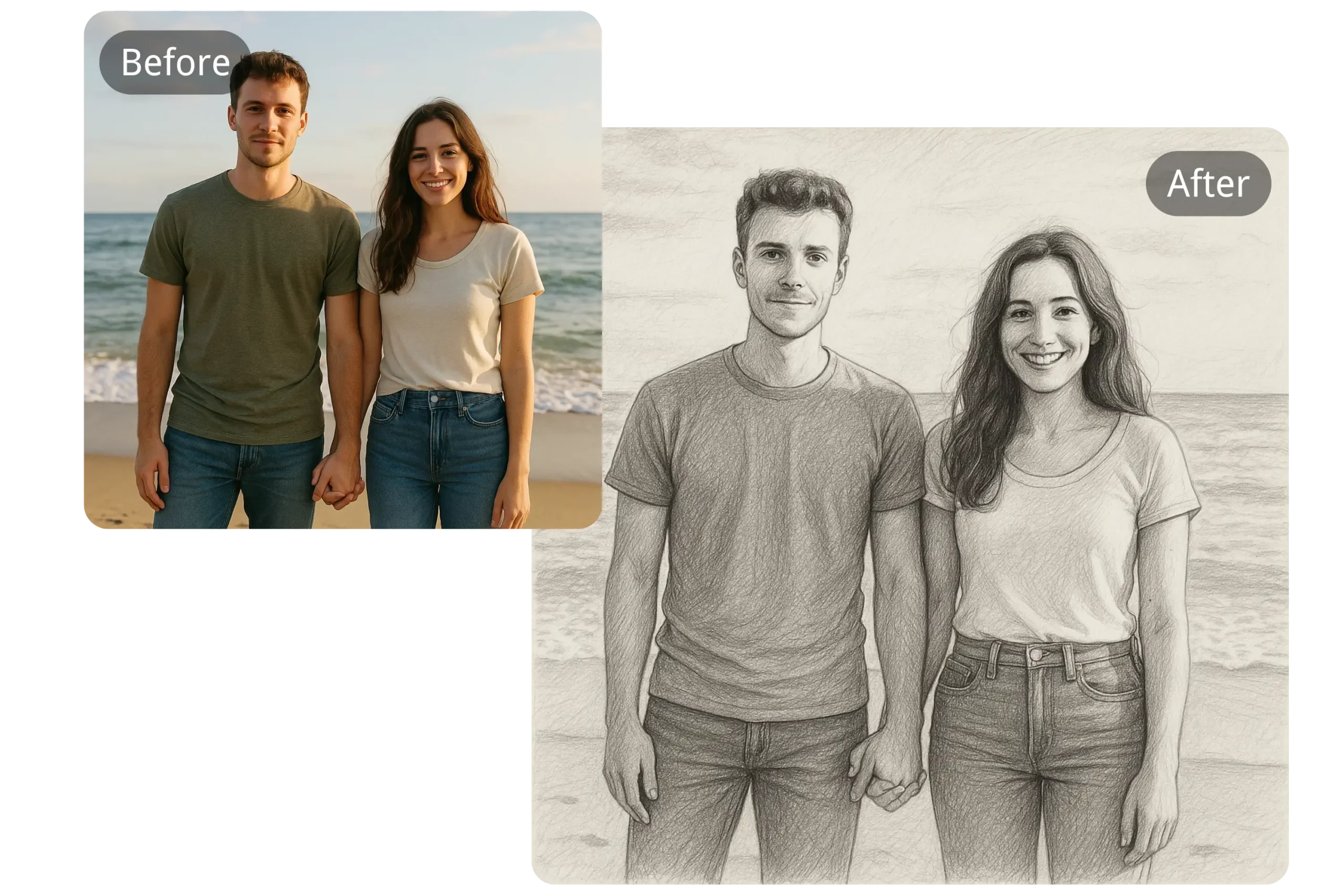
Why convert a photo to a sketch online
Turning a photo into a pencil sketch is a popular creative effect that transforms an ordinary photograph into something that looks hand-drawn. This effect works by detecting the edges and contours in a photo and rendering them as if drawn in pencil, while removing colour and most of the fine detail, leaving behind a striking line-art style image.
This kind of conversion used to require dedicated photo editing software or smartphone apps, but a browser-based sketch converter makes the process instant — no software to install, no app to download, just upload and download.
What happens when you convert here
Unlike apps and tools that require installing software or uploading your photo to a remote server, Firaa converts your photo to a sketch entirely inside your browser. Your photo never leaves your device — no upload, no server, complete privacy.
The tool analyses your photo’s edges and contrast using your browser’s canvas engine, converting the image into a grayscale line-art style result that resembles a pencil drawing, while preserving the overall composition and recognisable shapes from your original photo.
When you might want a sketch effect
These are common situations where converting a photo to a sketch is useful:
Social media content — A sketch-style photo stands out in a feed full of regular colour photos and can be a creative way to share a portrait, pet photo, or landscape in a more artistic format.
Gifts and personal projects — Many people convert a favourite photo to a sketch style as the basis for a printed gift, greeting card, or personal art project, since the line-art style often works well for printing or as a reference for actual hand drawing.
Profile pictures and avatars — A sketch-style version of a photo can make a distinctive profile picture that looks different from a typical photo, while still being recognisable.
Design and creative projects — Designers sometimes use sketch-converted images as a starting point or reference layer for digital illustration, or as a stylistic element in a larger design project.
How to convert a photo to a sketch — step by step
Upload your photo by clicking the upload button above. Photos with clear subjects and good contrast — like portraits, pets, or buildings — tend to produce the most striking sketch results. The tool accepts JPG, JPEG, PNG, and WebP formats.
Click the Convert to Sketch button. Your browser processes the image instantly, detecting edges and contours and rendering them in a pencil sketch style.
Download your sketch image. The result is a grayscale JPG file with a hand-drawn appearance, ready to share, print, or use in a creative project.
Tips for the best sketch results
Photos with strong contrast between the subject and background tend to convert into the clearest, most striking sketches. A portrait photo with good lighting, or a photo with a clearly defined subject against a simpler background, usually works better than a busy photo with lots of similar tones throughout.
If your sketch result looks too dark or too faint, try a different photo with different lighting — photos taken in bright, even light generally produce the cleanest edge detection and the most balanced sketch effect.
Frequently asked questions about photo to sketch conversion
Will the sketch look exactly like a hand-drawn picture?
The sketch effect approximates the look of a pencil drawing by detecting edges and contours in your photo, but it’s a digital filter rather than an actual artist’s interpretation. The result captures the outline and structure of your photo in a sketch-like style rather than true artistic shading and interpretation.
Can I convert a colour photo and keep the colour in the sketch?
This tool produces a classic black and white pencil sketch effect. If you’d like a coloured version of your photo instead, use our Black and White Converter for grayscale, or keep your original colour photo unconverted.
What types of photos work best for sketch conversion?
Portraits, pet photos, and photos of buildings or objects with clear outlines tend to produce the most recognisable and striking sketch results. Photos with very busy backgrounds or low contrast may produce a less clear result.
Is my photo safe — does Firaa upload it to servers?
No. Your photo is converted entirely inside your browser using JavaScript. Nothing is uploaded to any server at any point.
Can I print the sketch result?
Yes. The downloaded sketch is a standard JPG file that can be printed at any photo printing service or home printer, the same way you would print any other photo.
How is Firaa different from sketch apps?
Most sketch conversion apps require downloading an app to your phone and often include in-app purchases or watermarks on free versions. Firaa works directly in your browser with no app to install, no watermark, and no account required.