
Compress JPG to 100KB Online Free
Reduce JPG image size to 100KB online without losing quality. Fast, secure, and free image compression tool for forms, websites, email attachments, and social media uploads.
Why so many people need to compress JPG to 100KB
Most people searching for a way to compress JPG to 100KB have a very specific problem — an online form is rejecting their image. Government portals, university admission systems, job application portals, and visa application forms all set strict file size limits, and 100KB is one of the most common limits used across Pakistan, India, and the UK.
Your phone camera produces images between 2MB and 8MB. Even WhatsApp-compressed photos are usually 200KB–500KB. These are simply too large for most official upload forms. Firaa’s compressor reduces your JPG to under 100KB while keeping the image clear enough to be accepted — faces recognizable, text readable, documents legible.
What happens when you compress here
Unlike tools like TinyPNG or iLoveIMG that upload your photo to their servers, Firaa processes your image entirely inside your browser. Your photo never leaves your device. This matters especially when you are compressing ID card photos, passport photos, or official documents — you should never upload those to a stranger’s server.
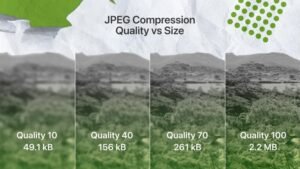
The tool uses your browser’s built-in canvas engine to reduce the JPG quality gradually until the file reaches your target size. You can use the quality slider to control how much compression is applied — higher quality means larger file size, lower quality means smaller file.
Which forms require images under 100KB
These are the most common situations where you will need a JPG compressed to 100KB or less:
Pakistani government and university portals — HEC, NADRA, FBR, NTS, PPSC, FPSC, and most university admission forms require profile photos and documents under 100KB. The NADRA online portal specifically rejects images above 100KB.
Indian government systems — UPSC, SSC, railway recruitment portals, and most state-level exam boards require photos between 20KB and 100KB. The IBPS banking exam portal is strict about this limit.
UK visa and official forms — Many Home Office and UKVI online forms require supporting document uploads under 100KB per file.
Job application portals — Most Pakistani and Indian corporate job portals including Rozee.pk and government job systems have file size limits on photo uploads.
University admission forms — Almost every Pakistani university’s online admission system including University of Punjab, FAST, NUST, and Aga Khan requires applicant photos under 100KB.
How to compress JPG to 100KB — step by step
Upload your JPG image by clicking the upload box above. This is the fastest way to compress JPG to 100KB directly in your browser. The tool accepts JPG, JPEG, PNG, and WebP formats. If your image is a PNG it will be converted to JPG during compression.
Use the quality slider to set compression level. Start at 70% — this reduces most phone photos to under 100KB while keeping them sharp. If the result is still above 100KB, reduce the slider to 50% and try again.
Click the Compress button. Your browser processes the image instantly — no waiting for uploads or server processing.
Download your compressed image. Your file is now compressed JPG under 100KB and ready to upload to any form or portal. The result appears below the tool with the new file size shown. If it is still above 100KB, simply reduce the quality slider further and compress again.
Getting the best results from JPG to 100KB compression
If your image is a large photo above 3MB and you need it under 100KB, you may need to set quality below 50%. At this level the image will look slightly softer but will remain clear enough for official use — form systems only need to confirm your identity, they do not need a high-resolution portrait.
If the image is still too large even at low quality, your photo may have very large dimensions like 4000×3000 pixels from a DSLR camera. In that case, use our Image Resizer tool first to reduce it to 600×800 pixels, then compress it. This combination will always get you under 100KB.
For passport-style photos specifically — crop your image to show just your face and shoulders before compressing. Smaller dimensions compress much more easily. Use our Crop Image Online tool for this.
Frequently asked questions about compressing JPG to 100KB
My compressed image is still above 100KB — what do I do?
Lower the quality slider to 40% or 30% and compress again. If it is still above 100KB, your image dimensions are too large. Use our Image Resizer first to bring it to 800×600 pixels or smaller, then run it through the compressor. The combination of smaller dimensions and compression quality will always get you under 100KB.
Will the compressed image be accepted by government forms?
Yes. Government and university portals only check file size — they do not check compression quality level. As long as your face or document is legible, the form will accept it. Thousands of users use Firaa specifically for NTS, PPSC, HEC, and university admission forms.
Is my photo safe — do you store it on your servers?
No. Your image never leaves your device. Firaa processes images entirely inside your browser using JavaScript. Nothing is uploaded to any server. This is especially important for ID photos, CNIC copies, and passport photos — keep those private.
Can I compress a PNG to 100KB using this tool?
Yes. Upload your PNG and the tool will compress it and save the result as a JPG file. PNG files are usually larger than JPGs so this conversion produces a significant size reduction. If you need to keep it as PNG format, use our PNG Compressor tool instead.
What is the difference between 100KB and 1MB?
1MB equals 1024KB. So 100KB is about 10 times smaller than 1MB. A typical phone photo is 3MB to 6MB — meaning you need to reduce it to roughly 2% to 3% of its original size to reach 100KB. This sounds extreme but JPG compression handles it well — the image looks nearly identical to the human eye at these compression levels.
How is Firaa different from TinyPNG or iLoveIMG?
TinyPNG and iLoveIMG upload your images to their servers to process them. Firaa does everything inside your browser — no upload, no server, no privacy risk. For most users the speed is also faster since there is no upload wait time.