
Black and White Image Converter Online Free
Convert any photo to black and white online free. Upload your image and download a clean grayscale version instantly. No upload to servers, no signup, 100% free.
No image selected
Why use a black and white image converter online
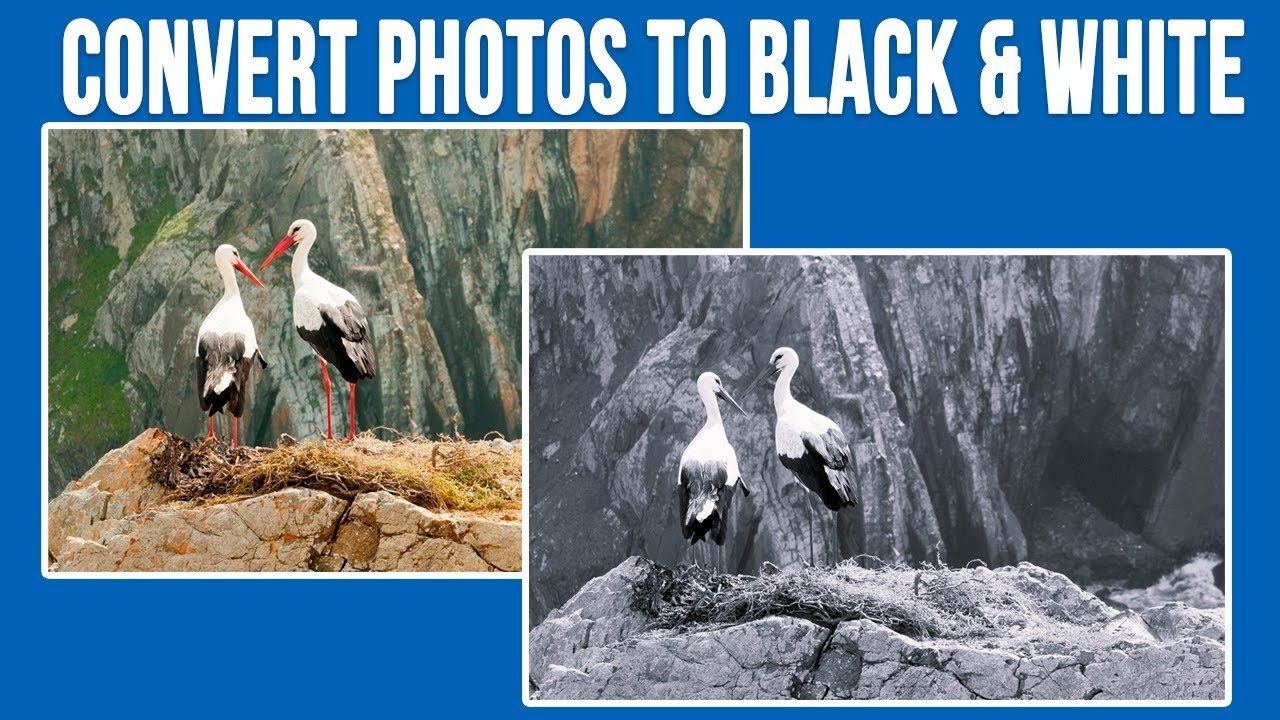
Converting a photo to black and white is one of the most timeless creative effects in photography and design. A black and white image converter removes all colour information from a photo while preserving the full range of tones from pure black to pure white, often producing a more dramatic, classic, or professional look than the original colour version.
Beyond creative use, black and white conversion is also practical. Many official document scans, ID photocopies, and printed forms across the UK and Europe are required or preferred in grayscale to reduce printing costs and file sizes. Converting a colour photo to black and white before printing or submitting can also make text and details easier to read by removing distracting colour contrast.
What happens when you convert here
Unlike tools like iLoveIMG or Canva that require uploading your image to an online editor or creating an account, Firaa converts your image to black and white entirely inside your browser. Your photo never leaves your device — no upload, no server, no account, complete privacy.
The tool uses your browser’s canvas engine to apply a grayscale filter that converts every pixel’s red, green, and blue values into a single brightness value, producing a true black and white image with smooth tonal transitions rather than a simple desaturation that can sometimes look flat.
Black and white vs grayscale vs desaturated — what’s the difference
These terms are often used interchangeably but technically describe slightly different results. A true black and white conversion maps each pixel to a single brightness value based on a weighted combination of the original red, green, and blue channels, which closely matches how the human eye perceives brightness — this is what our tool produces.
Grayscale is the technical term for an image that contains only shades of grey from black to white, with no colour information at all — this is the same result as black and white conversion, just a different name for it.
Desaturation simply reduces the colour saturation of an image toward zero, which can sometimes leave a slight colour tint and doesn’t always produce the same tonal balance as a proper grayscale conversion. Our tool performs a true grayscale conversion for the cleanest, most natural-looking result.
When you need a black and white image converter
These are the most common situations where converting an image to black and white is useful:
Professional photography portfolios — Many photographers in the UK and Europe present a mix of colour and black and white work in their portfolios. Converting select images to black and white can create a more cohesive, artistic presentation, especially for portrait and street photography.
Document scanning and printing — Printed forms, contracts, and official documents are often required in black and white to reduce printer ink costs and file sizes. Converting a colour scan to black and white before printing or emailing can significantly reduce file size while keeping all text perfectly legible.
Social media content — Black and white photos often perform differently on Instagram and other platforms, creating a distinct aesthetic for a profile or specific posts. Many content creators across the UK and Europe use black and white conversion as part of their visual branding.
Print materials and graphic design — Black and white images are often used in newspapers, brochures, and printed materials where colour printing isn’t available or cost-effective. Converting images before placing them in a layout ensures the final printed result looks intentional rather than like a colour image printed in grayscale by mistake.
Reducing file size for email or upload — A black and white version of a photo is typically smaller in file size than the colour original, since there’s less data to store per pixel. If you don’t need colour for a specific use case, converting to black and white first and then compressing can produce a smaller final file.
How to use this black and white image converter — step by step
Upload your image by clicking the upload button above. This black and white image converter works directly in your browser with no software installation needed. The tool accepts JPG, JPEG, PNG, and WebP formats.
Click the Convert to Black and White button. Your browser applies the grayscale conversion instantly with no upload wait time and no server processing delay.
Download your black and white image. The result is a clean JPG file with the same dimensions as your original, ready to use for printing, portfolios, social media, or document submissions. If you also need to reduce the file size, use our Compress JPG to 100KB tool after converting.
Frequently asked questions about black and white image conversion
Will converting to black and white reduce my image quality?
No. The conversion only removes colour information — it doesn’t reduce resolution, sharpness, or detail. The black and white version will be just as sharp as your original photo, simply without colour.
Can I convert a PNG image to black and white?
Yes. Upload your PNG and the tool will convert it to a black and white JPG. If your PNG has a transparent background, the transparent areas will become white in the black and white output, since JPG doesn’t support transparency.
Is my image safe — does Firaa upload it to servers?
No. Your image is converted entirely inside your browser using JavaScript. Nothing is uploaded to any server at any point. Your photos stay completely private on your device.
Can I convert the black and white image back to colour afterwards?
No. Black and white conversion permanently removes colour information from the image. If you need to keep the original colour version, make sure to save a copy of your original photo before converting, since the download will be a separate black and white file and won’t overwrite your original.
What is the best use for black and white photos?
Black and white works particularly well for portrait photography, architectural photos, documents and scans, and any image where you want to emphasise contrast, texture, and composition over colour. It’s also useful for creating a consistent visual style across a set of images for a portfolio or social media profile.
How is Firaa black and white image converter different from others?
Most online photo editors including Canva require creating an account and uploading your image to their platform. Firaa converts entirely in your browser — no account, no upload, instant results, and completely free.